










Trusted by 2,000,000+ users worldwide

Custom Home Builder Scheduling Software

Finish on schedule. Keep clients coming back.

Get powerful scheduling that's easy to use—without paying for estimating, accounting, or CRM tools you don’t.
Trusted by teams around the world
One schedule shift can put the whole construction job at risk. See how Builder Edition keeps you ahead.
Get a personalized demo →

Easy scheduling for custom builds that stay on track

Plan every phase fast

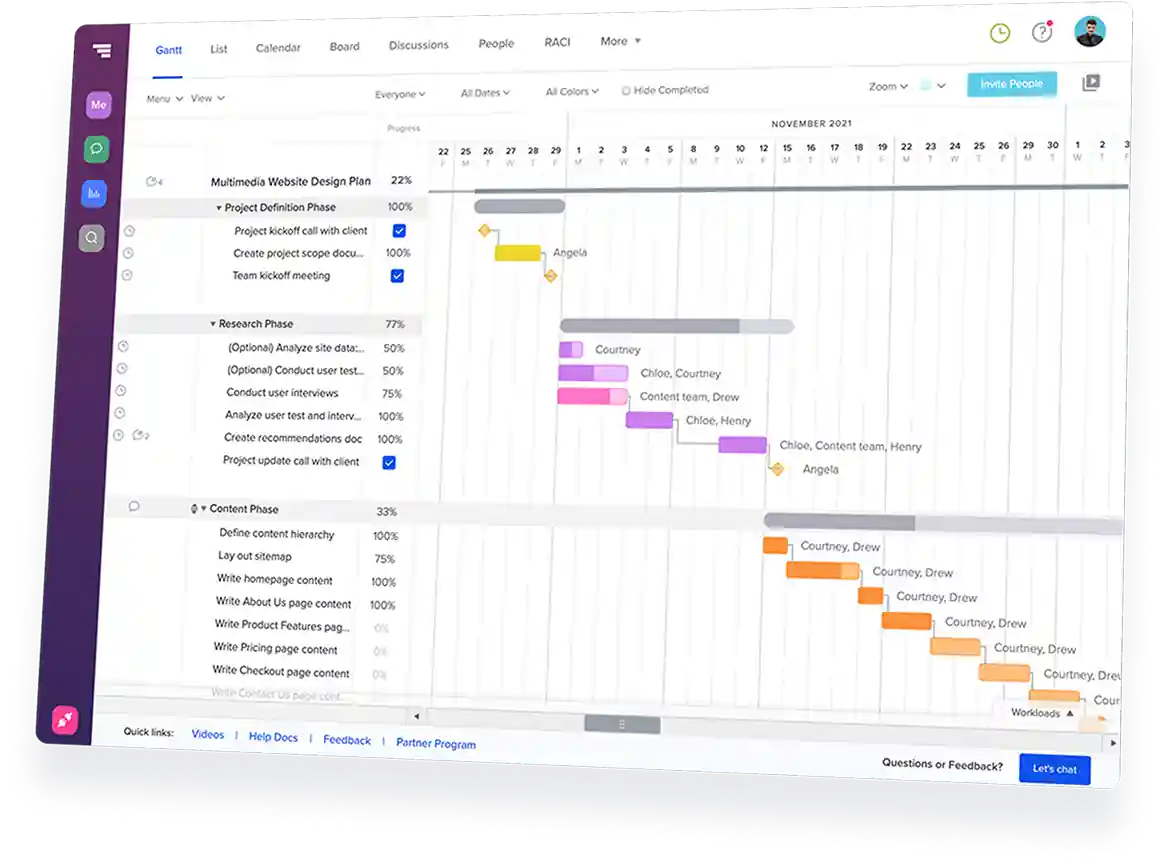
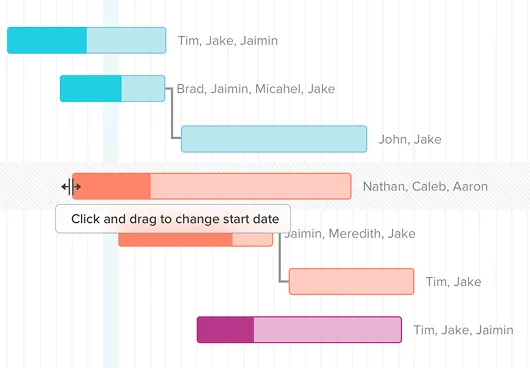
Drag and drop tasks on a shared timeline
Link tasks to keep dependencies intact
Start new builds faster with reusable templates

Stay ahead of delays

Compare planned vs. actual progress with baselines
Highlight critical path tasks before delays spread
See active projects in one portfolio view

Keep subs and homeowners aligned

Share live schedule links with clients and subs
Confirm sub dates by email or text
Coordinate without logins or app downloads

Multiple views, one schedule

Switch between Gantt, calendar, list, or Kanban
Keep photos, notes, and change details on tasks
Update once, and every view stays current

Features for coordinating clients, subs, costs, and materials

Client portal for homeowner visibility

Keep homeowners informed without extra calls or emails
Share milestones, groups, or the full project schedule
Let clients view schedules, messages, and photos in one place
Send a portal link by email or text—no login required

Subcontractor schedule confirmation

Know who’s showing up before the schedule slips
Send date confirmations to subs by email or text
Let subs confirm or flag conflicts without logging in
See who’s confirmed, pending, or at risk at a glance

Cost-loaded scheduling for cash flow tracking

Track job costs directly on your Gantt chart
Assign costs to tasks and see project totals roll up automatically
View planned work by phase, month, or build
See how schedule changes affect projected cash flow

Material lead times tied to scheduled tasks

Order materials before they delay the build
Attach lead times to install tasks so order deadlines stay visible
Get alerts when late orders put scheduled work at risk
Move a task and material timing updates automatically

Success stories from
real construction teams

10-20%
saved on admin time
TeamGantt helps Maddox Planning work smarter, cutting admin time by 10-20%, with visibility to stay on schedule.
30%
revenue growth in 6 months
TeamGantt helped DayBrook Kitchen & Baths triple their revenue and earn more 5-star reviews from happy clients.
Dozens
of spreadsheets replaced
TeamGantt helps Champion Industrial keep office and field teams in sync and project delays under control.

Why custom home builders choose TeamGantt

Easier than legacy tools

Skip the complexity of large construction platforms. TeamGantt keeps schedules clear, updates quick, and access simple for everyone involved in the job.

Schedule-first, not an add-on

Your Gantt chart is the center of the work, not buried inside a big system. Baselines, dependencies, confirmations, and lead times all tie back to the schedule.
Connected to everyone

Your team manages the full plan, subs confirm scheduled dates, and homeowners see the updates you choose to share. Everyone gets the right level of access.
Built for residential builders

Still comparing tools?

See how construction scheduling software stacks up across pricing, features, and project fit before you commit.
Explore our Construction Buyer's GuideBook a personalized demo

Fast, friendly support you can count on

Quick answers when you need them from people who’ve got your back.
<5 min
Average response time during weekdays
7 days
Weekday, weekend, and evening support
100+
Tutorials and docs available on-demand

Frequently asked
questions

Need more info?
Check out our help center for all the details.
Browse our help center

What is custom home builder scheduling software?

Custom home builder scheduling software helps residential builders plan, sequence, and track construction tasks across multiple concurrent home builds. It gives your subs, superintendent, and homeowner clients a shared schedule they can access in real time, so you spend less time on status calls and more time building.

Why use TeamGantt for custom home builder scheduling?

TeamGantt is built around the Gantt chart, so every feature ties back to your central schedule: material lead times, baseline tracking, sub confirmations, and client-facing schedule links. Drag-and-drop scheduling makes it straightforward to plan and adjust construction timelines. Your sub sees the schedule on their phone without creating an account, and your homeowner gets a live portal with messages and photo updates instead of a PDF that’s outdated by Friday.

Can my subcontractor see the schedule without logging in?

Yes. Send a confirmation email or text, and your sub clicks a link to see their dates and confirm or flag an issue—no account, no password. When dates shift, send an updated confirmation in one click. Your sub sees what they need to see, nothing more.

How do I handle change orders in TeamGantt?

TeamGantt doesn’t have a dedicated change order module, but builders document scope changes using task notes and baselines, with a timestamp and audit trail. When a change happens, add a note describing the change and cost impact, then set a new baseline. You get a dated record of what changed, when, and how it affected the schedule—visible to anyone with project access.

How does TeamGantt compare to Buildertrend for small custom home builders?

Buildertrend is a full construction management platform for scheduling, selections, client portals, accounting, and more.

TeamGantt focuses on the scheduling layer: Gantt charts, baselines, sub confirmations, material lead times, cost-loaded tasks, and client-facing schedule links. If you mainly need scheduling and subcontractor visibility, you’re paying for the scheduling tools you use—not a larger platform you don’t. Builder Edition is $199/month flat, with no per-user fees as your team grows.

TeamGantt does not offer native QuickBooks integration or estimating tools. If those are hard requirements, it works best alongside a separate financial tool.

Can I share a live schedule link with my homeowner client?

Yes. Set up Client Portal and choose what to share: milestones only, groups only, or the full schedule. Your client gets a portal to view the schedule in list or calendar format, see photo updates and comments through a messaging inbox, and stay informed without calling you. Send the invite from TeamGantt, or copy the link and text it directly.
1,000+ 5-star reviews,

96% customer retention

  • Plan and schedule projects faster
  • Keep teams aligned in real time
  • Deliver on time—with less stress
Try TeamGantt Builder Edition free for 14 days
Cancel anytime.
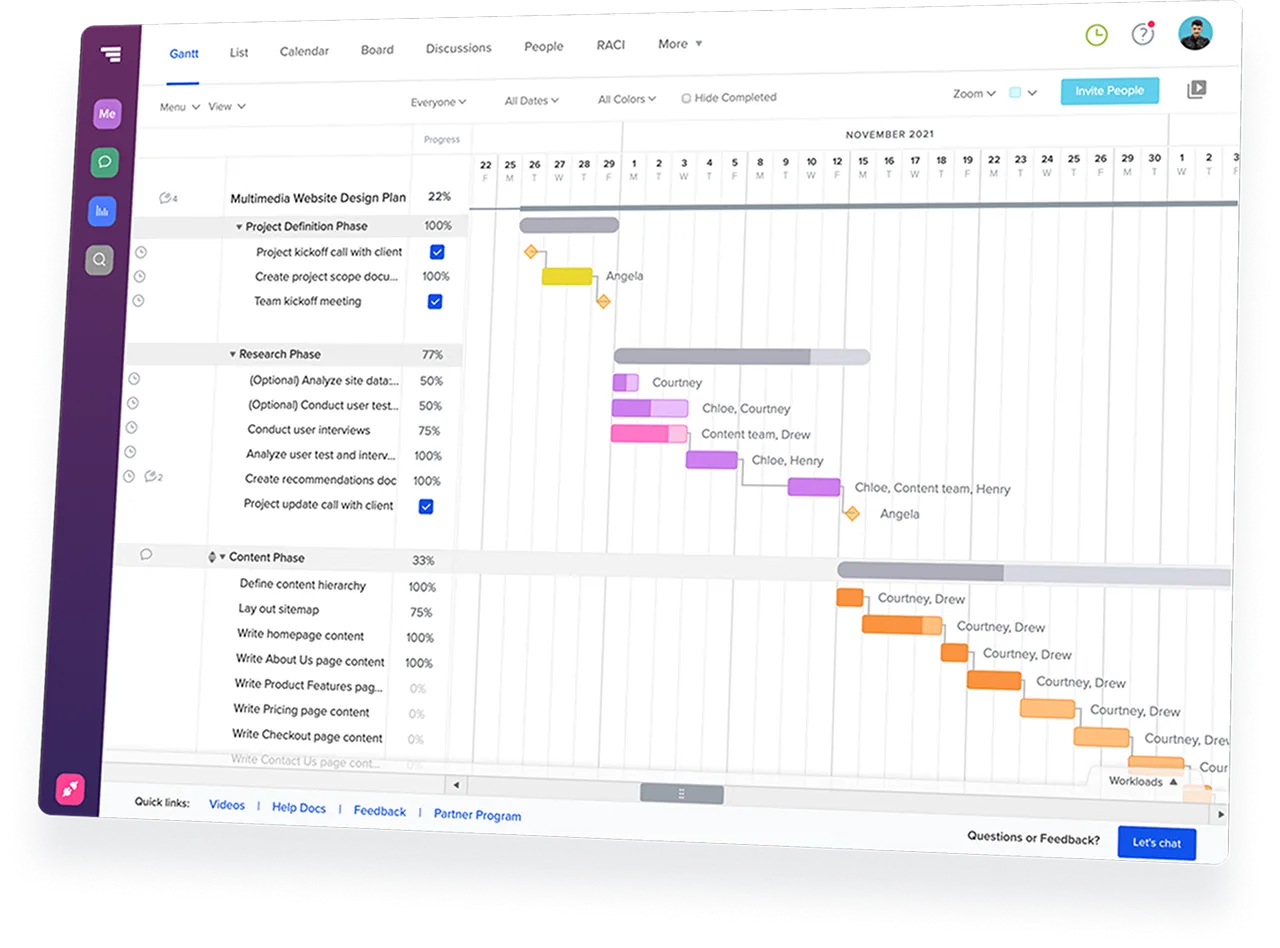
TeamGantt Gantt chart software displaying a construction project timeline with task groups and dependencies.
Rating
4.8
Rating
4.6
Rating
4.6
G2 Crowd logo
GetApp logo
Capterra logo