The campaign launches Tuesday. Design is still waiting on copy, the landing page needs approval, and the email team just found out they’re sending an announcement. Everyone’s working toward the same launch, but they’re working from different plans.
A marketing calendar turns your marketing plan into a shared schedule, with time for the work, reviews, and handoffs behind each launch. This guide shows you how to build one around your team’s workload and keep it current when priorities change. Use the template to follow along.
What is a marketing calendar?
A marketing calendar is a schedule of key events and activities that need to be completed over a specific period of time. It’s great for mapping out important dates and deadlines so your team can easily see what needs to be accomplished for the month, quarter, or even year.
The format of your marketing schedule is up to you. It can be a Gantt chart, calendar, Google Sheets doc, or Kanban board, as long as everyone has access to it and can collaborate on tasks. Be sure to include a few key basics on your marketing calendar:
Tasks or milestones that need to be completed
Who’s responsible for each task or milestone
When work needs to be delivered to ensure major deadlines are met
When everyone works from the same schedule, nobody has to ask what’s due next or who’s handling it.
What to include on your marketing calendar
A useful marketing calendar answers 3 questions for every entry: what it is, who owns it, and when it's due. These 6 fields cover those answers and give your team enough context to act without asking:
Campaign or initiative name, so every task rolls up to work the team recognizes
Channel, such as email, paid social, events, or the website, so channel owners can find their work
Owner, so one person answers for each task even when several people contribute
Start and due dates, so you can see overlaps and handoffs along with the final deadline
Approval or review milestone, so every sign-off has a date of its own
Status, so anyone can tell what's on track, at risk, or done without calling a meeting
Approval is the field teams skip most often, and it's usually where marketing timelines slip. A legal review or executive sign-off that runs 3 days late pushes design, email, and launch work behind it. Put each review on the calendar as a dated milestone, and name the approver so any wait shows up before it threatens the launch date.
Types of marketing calendars
Most teams run one master marketing calendar plus a few channel-level calendars that feed it. The master calendar gives leadership the big picture, while each feeder calendar holds the day-to-day detail for one channel or program. Here are the types you'll see most often:
An annual or quarterly master calendar that holds every launch, campaign, and anchor date in one marketing planning view
A campaign calendar that sequences the brief, creative, launch, and reporting for one digital marketing campaign
A content calendar (or editorial calendar) that tracks what gets published, where, and when
A social media calendar that plans posts by platform and day, much like a social media planner
An event and launch calendar that maps the prep, promotion, and follow-up in your event management plan
Start with the master calendar, then add a channel calendar only when that channel has its own owner and a weekly cadence. Anything smaller can live as a group of tasks on the master calendar, which keeps everything in one place, with fewer calendars to update. Example 2 further down shows how that grouping looks on a Gantt chart.
Marketing calendar vs. content calendar
A marketing calendar covers every initiative your team runs, including launches, campaigns, events, and content. A content calendar zooms in on one slice of it: what gets published, when, and on which channel.
Marketing calendar | Content calendar | |
What it covers | Every initiative: launches, campaigns, events, and content | Content only: what gets published, when, and where |
Level of detail | Milestones, handoffs, and approvals across teams | Topics, channels, drafts, and publish dates |
Main question it answers | What's launching, and what has to happen first? | What's publishing next, and is it on track? |
Keep the marketing calendar as the place where content deadlines meet launch dates.
How to create a marketing calendar
You can build a marketing calendar in 6 steps, starting with the dates you can’t move.
1. List out your marketing initiatives
Start by taking inventory of your marketing initiatives.
List the recurring work you already deliver, like email newsletters, blog posts, videos, webinars, and podcasts.
Then add the upcoming campaigns, projects, and initiatives you need to plan for.
Before you add a single task, place the fixed dates that everything else has to work around. These anchor dates set the boundaries for your marketing schedule:
Product launches and release dates
Quarter ends and budget deadlines
Trade shows, conferences, and company events
Seasonal peaks for your industry
Company blackout periods and team holidays
Once those dates are set, every campaign has a target to work back from. Anchor dates also show conflicts early: a webinar the week before a trade show competes with the event promo for the same designer.
2. Break initiatives down into tasks and milestones
Break each initiative on your list into its key tasks and milestones.
Want to create a high-level marketing calendar? You might focus on launch dates, important meetings, and major deadlines. Feel free to get granular if your team works better with more detail.
Treat approvals, handoffs, and launch dates as milestones, since those are the fixed checkpoints the rest of the work depends on. For help choosing which dates deserve one, see this guide to project milestones.
A single webinar, for example, breaks down like this, in the order the work has to happen:
Topic and speaker approval (milestone)
Landing page copy
Landing page design and build
Email invites
Promo posts on social
Speaker dry run
Live webinar date (milestone)
Work backward from the live date to set rough lead times. Say invites go out about 3 weeks ahead and design takes about a week. The copy then has to be approved before either can start, and that's the assumption you'll test with your team next.
3. Collaborate on timing and resource availability
Bring your team into planning early. The people doing the work know how long it takes and what it depends on, which is what makes a timeline accurate.
Holidays, vacations, and other deadlines limit who’s available, so cover them in the same conversation.
Before you commit dates, check capacity. In TeamGantt, Workloads shows how many tasks are assigned to each person per day, in the current project or across all active projects. You'll spot a designer who's double-booked during launch week while there's still time to change the plan.
When someone looks overloaded on the same days, decide what gives first: the lower-priority task, the owner, or the date. Make that call before the calendar goes out to the team.
4. Schedule your marketing calendar in your favorite planning tool
Now put everything into one shared calendar your whole team can see.
The right format depends on how your tasks relate to each other. A spreadsheet or calendar works well when dates are independent, like a weekly newsletter that ships no matter what else is happening. Choose a Gantt chart when one deliverable can't start until another finishes, such as email invites that wait on a finished landing page.
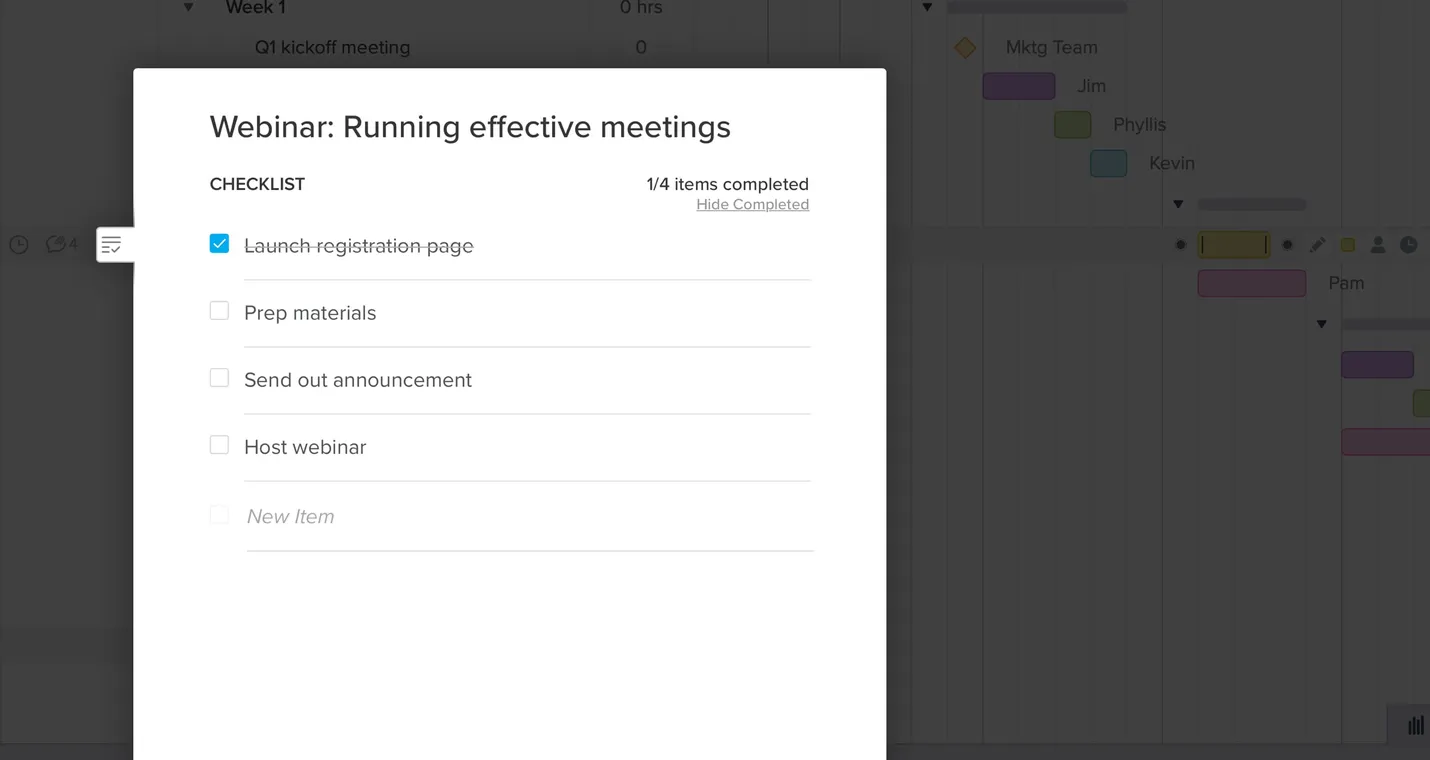
Add the details, documents, and links your team needs to each task, so nobody has to hunt for them. To break a task into smaller steps, add a task checklist in TeamGantt.
5. Identify and assign task owners
Give every task one owner, even when several people contribute. Shared ownership feels collaborative, but it leaves nobody accountable when a deadline slips. Name the approver on the approval milestone itself, so the person who signs off sees that date as their own.
Use a RACI chart to clearly outline roles and responsibilities. That way there’s no question about who’s responsible for the work, who has final say on deliverables, and who needs to be kept in the loop on progress.
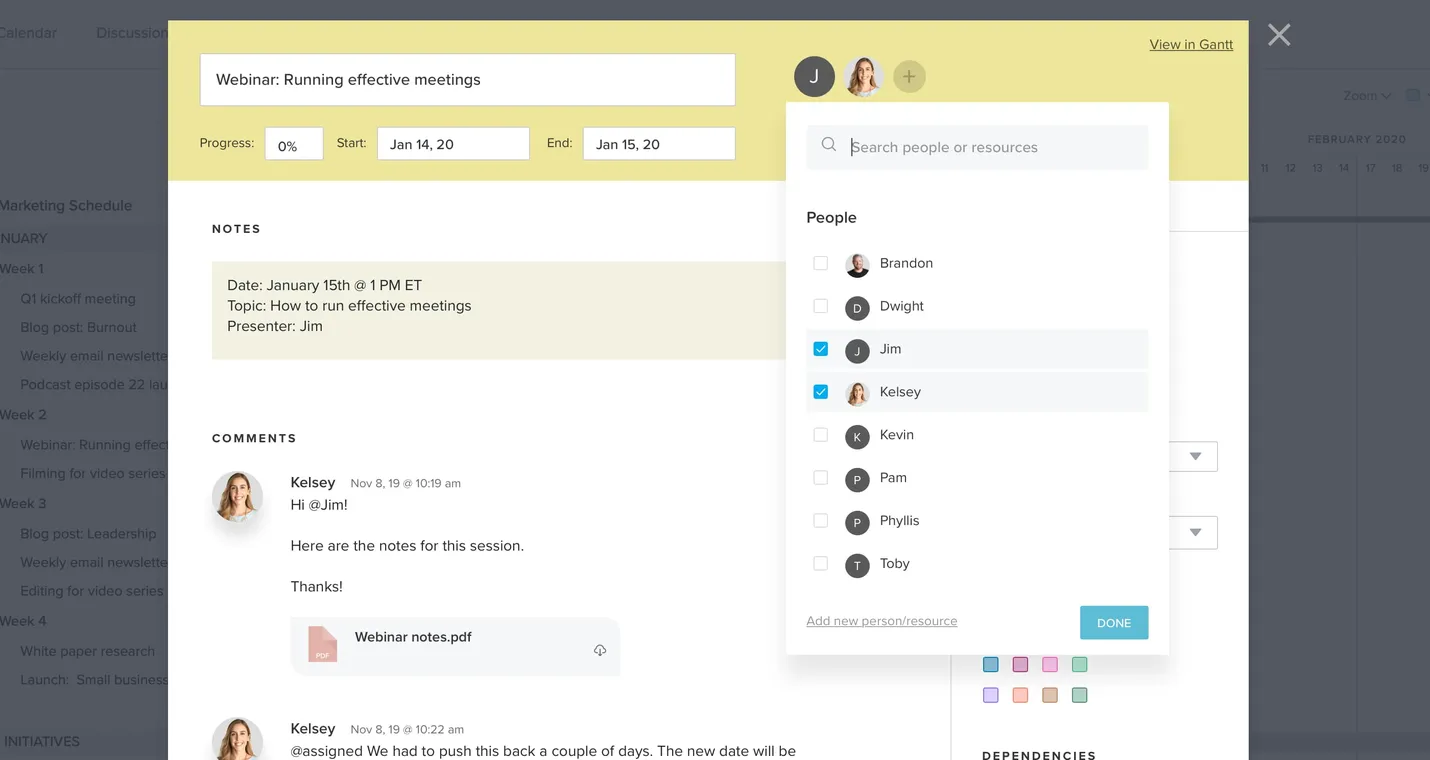
In TeamGantt, add your team and assign them to tasks, so everyone sees their work on the calendar.
6. Be flexible, and communicate changes
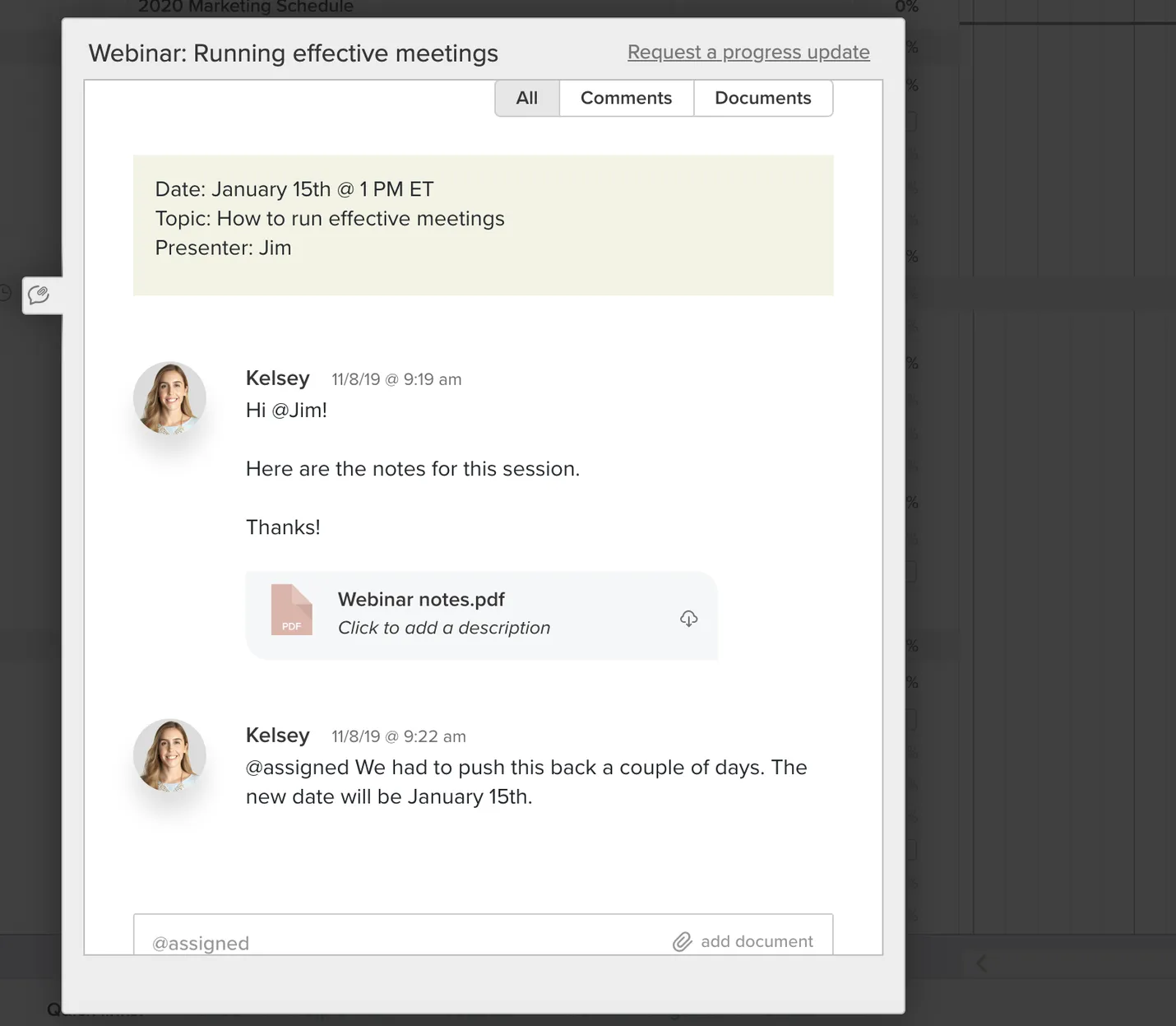
Plans change. When they do, drag tasks to their new dates in TeamGantt, and use comments to keep each update on its task.
When a date moves, check what's linked to it before you tell the team. If you've connected tasks with dependencies, you can see which downstream tasks the change affects. Then post one comment that covers what changed, why, and what it affects, so the update lives on the task where owners will find it.
Marketing calendar examples
Here are a few examples of how to use your marketing schedule in TeamGantt. Pick the view that matches the question you need answered: what's happening this month, how work connects across a quarter, or what's on your own plate today.
Calendar view
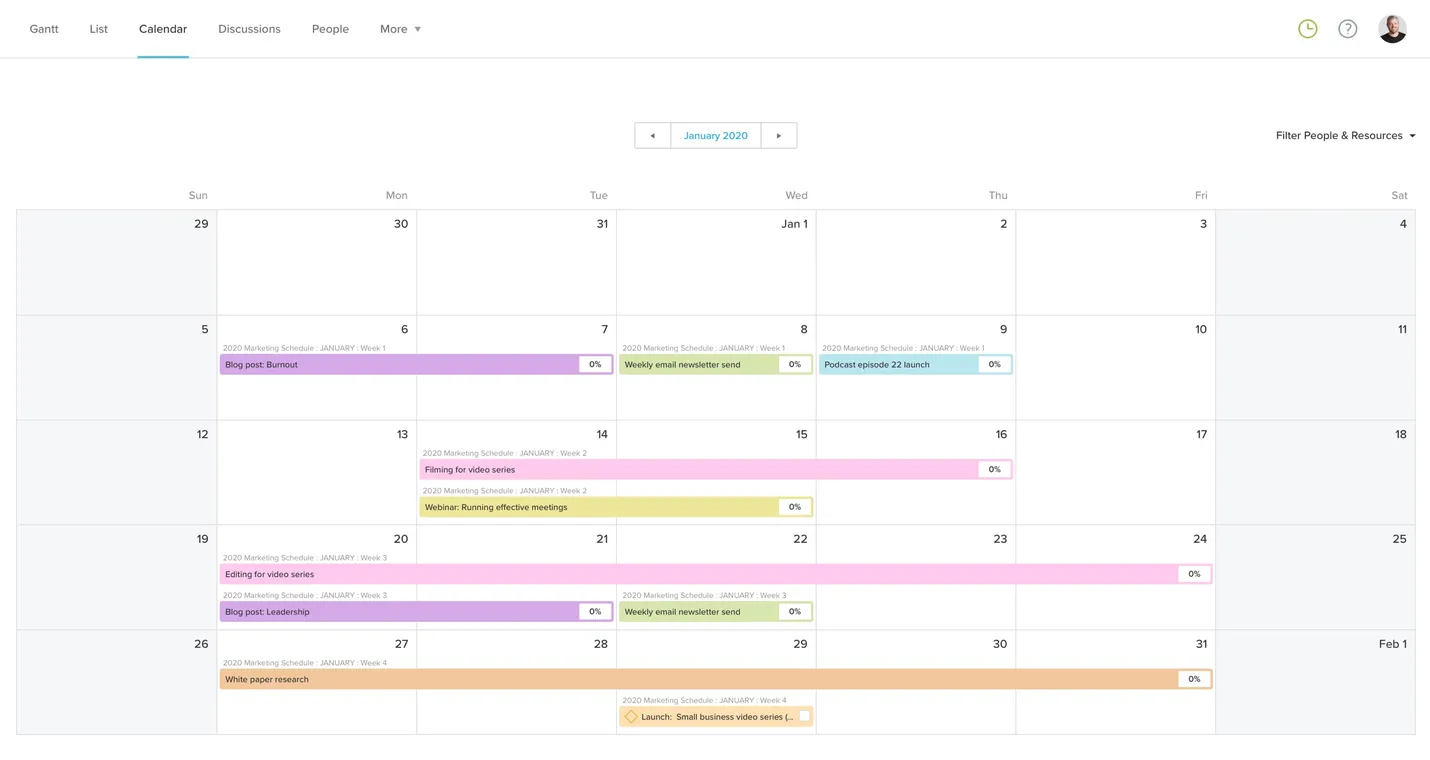
Calendar view maps your activities by day, week, or month, the format most marketers already know. Switch to it in TeamGantt, or sync tasks to your favorite calendar app.
The calendar feed is one-way. TeamGantt tasks show up in Google Calendar, iCal, or Outlook, but events you add there don't come back into TeamGantt. Make date changes in TeamGantt, and use the feed to see deadlines next to your meetings.
Gantt view
Gantt view shows your schedule across weeks or months, with every task and milestone on one timeline. It’s also where you map dependencies to see how tasks connect.
Link tasks when one can't start until another finishes, so you can see what a change affects before you commit to it. Leave independent work unlinked, because extra links make the Gantt chart harder to read without telling you anything new.
There are 2 common ways to structure a marketing calendar in Gantt view.
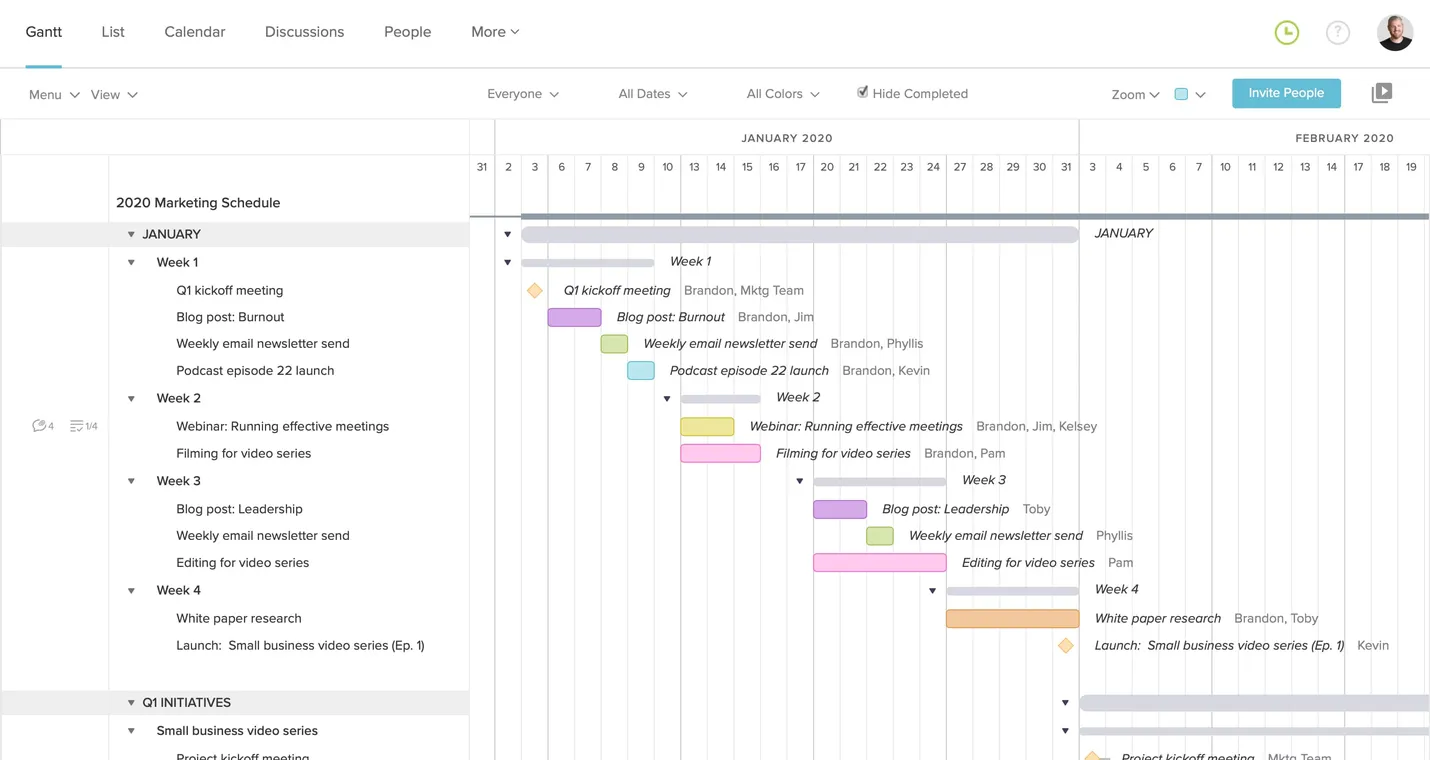
Example 1: Group tasks by time frame
Grouping by month or quarter puts every initiative's work side by side in the period it happens. Use this structure for a master calendar that leadership reviews, since crowded months and stacked launch weeks stand out at a glance.
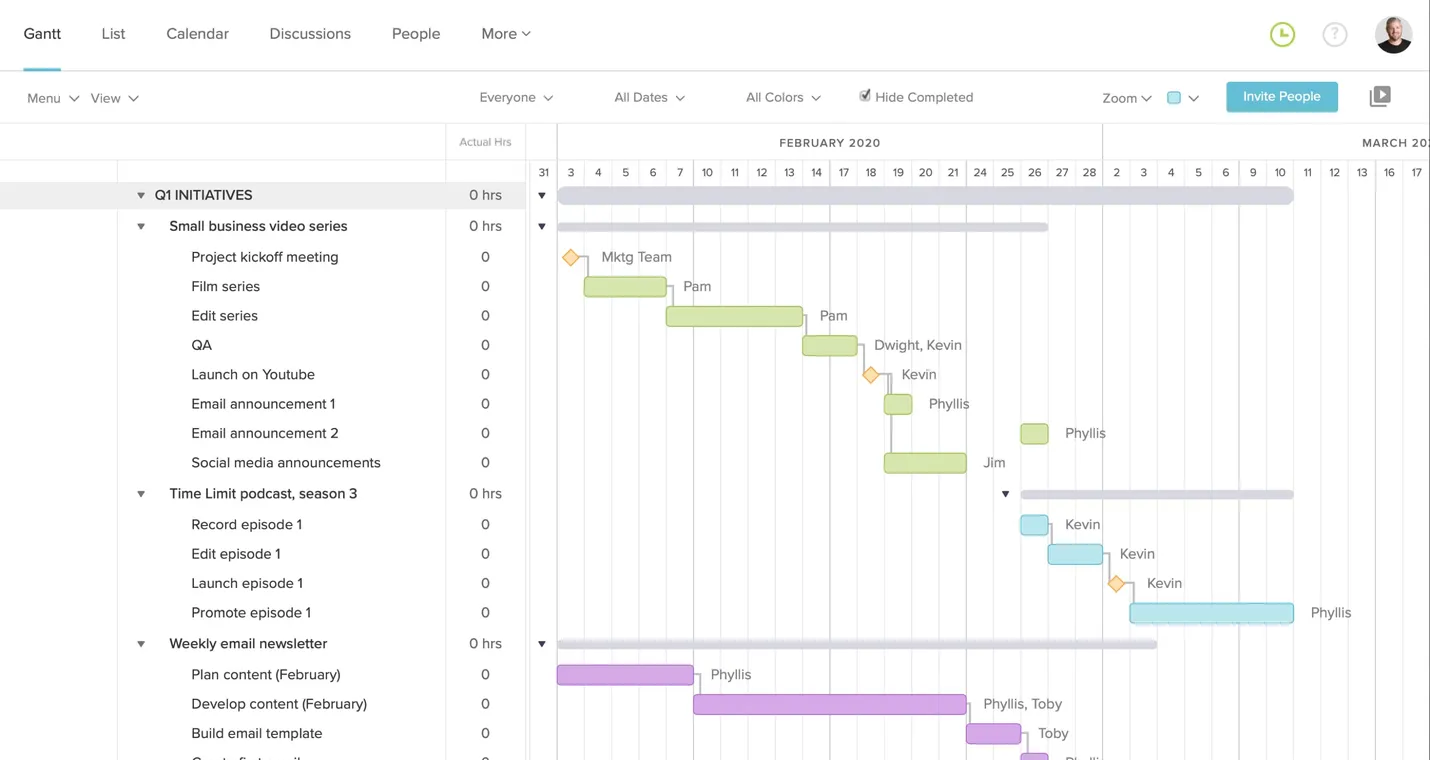
Example 2: Group tasks by project or initiative
Grouping by campaign or launch keeps all the tasks for one initiative together. Choose this structure when each initiative has its own owner and you need to see the handoffs inside it.
Color-code tasks by activity type so you can see what kind of work is scheduled in any week.
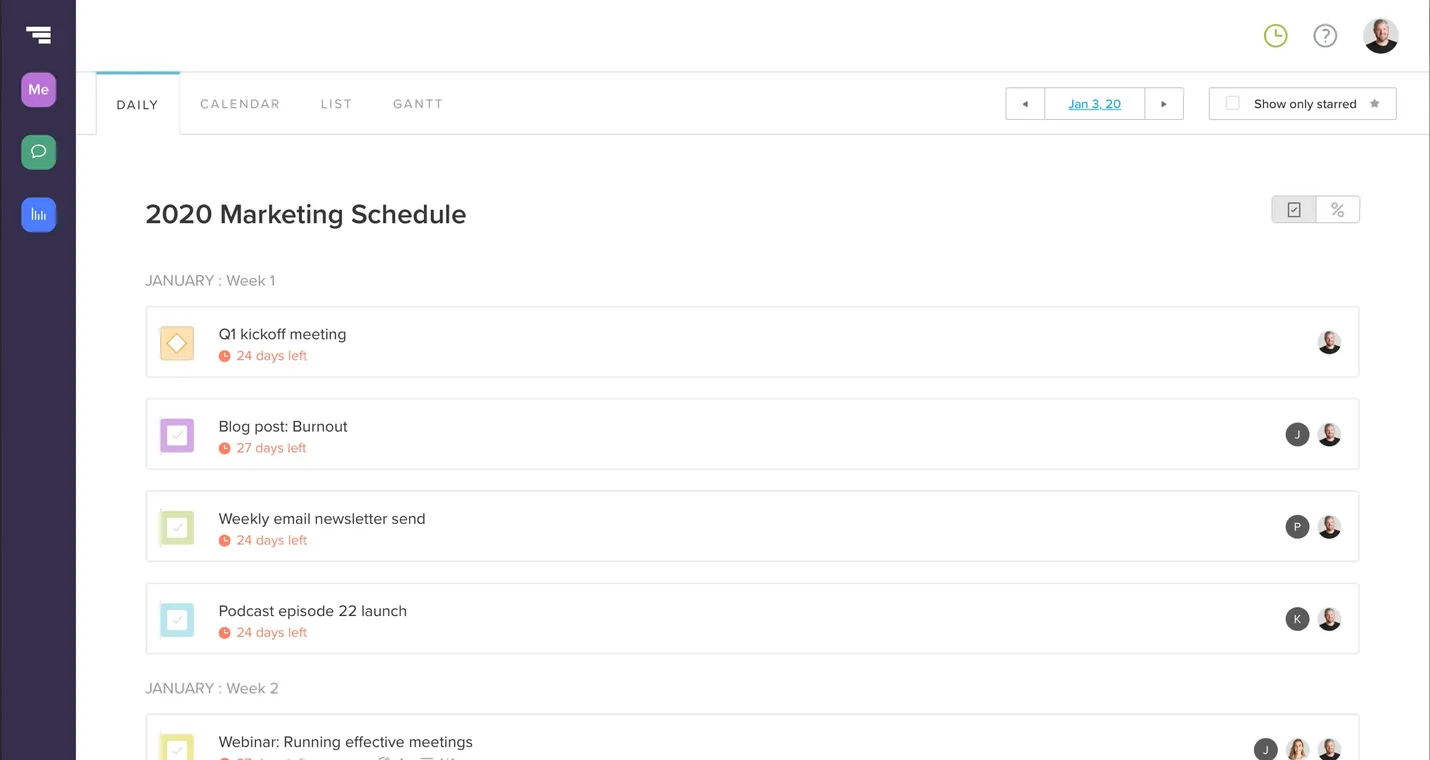
Daily tasks
To see just your own work, open My Tasks in TeamGantt. It pulls every task assigned to you across projects into one list, grouped by what's past due, in progress, and coming up.
How to keep your marketing schedule on track
A marketing calendar stays useful only if someone reviews it on a set rhythm. A 15-minute weekly check covers it for most teams, as long as it happens at the same time and asks the same questions:
Tasks and milestones due in the next 2 weeks
Approvals that are still pending
People who look overloaded in Workloads
Dates that moved since last week, and what they affect
Run the review with the timeline open on screen. When everyone looks at the same plan, decisions happen in the meeting instead of in follow-up threads.
When an approval stalls
A stalled approval puts every task behind it at risk, so make the delay visible as soon as it happens. Keep the approval as a dated milestone on the calendar until you agree on a new date. Then reschedule the dependent tasks to match, and tell each owner what changed.
When two campaigns collide
Two launches in the same week compete for the same people, the same inbox space, and the same approvers. Use the time-frame grouping from Example 1 to spot stacked launch weeks while there's still room to move one. Check Workloads for the people both campaigns share before you decide which date gives.
When stakeholders keep asking for status
Repeated status requests usually mean stakeholders can't see the plan for themselves. Share a view-only link to the live timeline, so they see current dates every time they open it. You'll spend less time writing updates and more time on the work those updates describe.
Marketing calendar template
Our marketing calendar template gives you a ready-made schedule to start from, so you skip the setup. Try it free for 14 days.
Spend your first 15 minutes with the template turning the sample schedule into your own. This order saves the most rework:
Rename the groups to match your quarters or initiatives.
Delete the tasks you don't run.
Drag dates to your real launch and anchor dates.
Invite owners and assign each task.
Add an approval milestone before each launch.
Need a different starting point? Browse more templates for campaigns, events, and other schedule-driven projects.