Managing multiple jobs and feeling the chaos? See a simpler way to stay in control—without bloated enterprise software.
Get a personalized demo →
Product
Platform
Features Overview
Project Scheduling
Project Tracking
Resource Management
Project Collaboration
Task Management
Product Updates
Customer Reviews
Integrations
Trello
Procore
Slack
Zapier
TeamGantt API
Calendar Feed
Dropbox
Microsoft Project
Basecamp
All Integrations
See How TeamGantt Works
Watch how TeamGantt helps teams like yours meet deadlines and streamline communications
Watch it in action
Construction
Overview
Construction Scheduling
Construction Software Buyer's Guide
Construction Templates
AI Construction Schedule Maker
Case Studies
Pricing
Who we serve
Custom Home Builders
Residential Remodelers
Trade Contractors
Small Commercial GCs
Construction Project Managers
Construction Ops Managers
Compare Alternatives
vs. Buildertrend
vs. JobTread
vs. Procore
vs. Outbuild
vs. MS Project
vs. MS Planner
30%
revenue growth in 6 months
TeamGantt helped DayBrook Kitchen & Baths triple their revenue and earn more 5-star reviews from happy clients.
Read case study →
Book a personalized demo
AI Gantt Chart Maker
Pricing
Resources
Learn
Blog
Guides
Help Docs
Video Tutorials
TeamGantt on YouTube
Templates
Project Management
Construction
Product and Software
Marketing
Design
Event Planning
Gantt Chart Template Hub
AI Gantt Chart Maker
Build a project timeline fast with the magic of AI-powered planning.
Gantt Chart Software Buyer's Guide
Compare top Gantt chart tools by pricing, features, and team fit.
Log In
“Everything was very clear, everything was organized and easy to use.
So I highly recommend TeamGantt. It's great.
”
Alex Greenberg
Head, NGX Interactive
Try TeamGantt Free
No credit card Required. Cancel anytime.
Log in
Sign up for free
Trusted by 2,000,000+ users worldwide
Deliver every project on time with the
features teams rely on the most
TeamGantt combines simple scheduling, real-time tracking, and effortless collaboration—all in one place.
Try free
See pricing
Trusted by teams around the world
One schedule shift can put the whole construction job at risk. See how Builder Edition keeps you ahead.
Get a personalized demo →
Most popular features
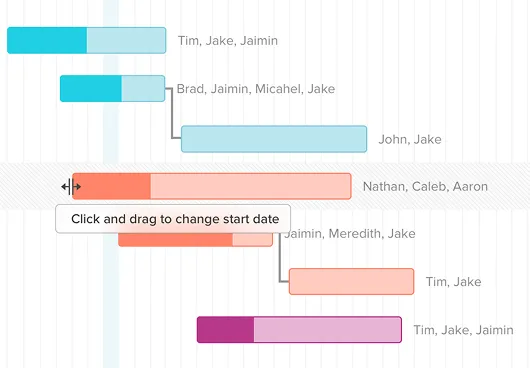
Watch tasks shift instantly with drag
Easy-to-use Gantt charts
Plan timelines faster with a simple and intuitive drag-and-drop interface.
See the same plan in any format.
Centralized collaboration
Keep everyone aligned around one live schedule. No more static PDFs.
Spot overloaded teammates before it’s too late
Multiple project views
Work in Gantt, list, board, or calendar views—all synced in real time.
Send real-time snapshots to anyone instantly
Global resource management
Manage people and assets easily to prevent double-booking.
Try FREE for 14 days
See all features
Dec. 1, 2025
What’s new in TeamGantt
Schedule confirmation
Ensure subcontractors sign off on schedule changes right from the field—no login needed.
Feature
highlights
Full dependency tracking
Easily map every task relationship with custom lead or lag times.
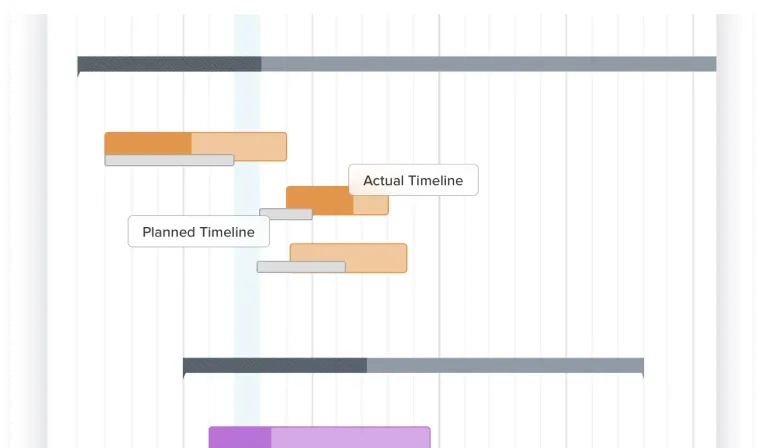
Planned vs. actual timelines
Track your original plan against reality to stay accountable.
Critical path visibility
See a clear path to on-time delivery in your Gantt chart.
Financial forecasting
Predict budgets and track cash flow easily from your schedule.
Procurement tracking
Link material orders to install tasks so dates update automatically.
Portfolio management
Monitor project status and risk in real time across every job.
See all 21 features
Trusted by 2,000,000+ users worldwide
See why people choose
TeamGantt
▷ Watch Review
0:30
“Everything was very clear, everything was organized and easy to use.
So I highly recommend TeamGantt. It's great.”
Alex Greenberg
Head, NGX Interactive
▷ Watch Review
0:30
“I recommend TeamGantt to people who want a relatively simple tool.
It's simple to get started and easy to use and it has a lot of flexibility.”
Pieta Balkely
Head, Blakely Consulting, LLC
▷ Watch Review
0:30
“TeamGantt has allowed us to create a
better workflow and account for dependencies and unexpected delays.”
Liana Simstrom
Supervising Producer, NPR
Features at a glance
Filter by use case (select all that apply)
📆 Project scheduling
📊 Project tracking and control
🫂 Resource management
💬 Project collaboration
⚙️ Task management
Clear selected filters
Visual timelines
See every task on a simple Gantt chart.
Drag-and-drop scheduling
Adjust timelines and reorder tasks instantly.
Task dependencies
Keep plans intact even when timelines shift.
Custom lead/lag time
Control task overlap and delays with precision.
Critical path analysis
Highlight key tasks that drive completion.
Milestone tracking
Mark key dates and track progress toward goals.
Lookahead schedules
Focus on upcoming work for short-term planning.
Baseline reporting
Compare planned vs. actual progress quickly.
Cost-loaded scheduling
Forecast cash flow from your schedule.
Material lead time tracking
Track material orders alongside install tasks.
Schedule confirmation
Get quick subcontractor sign-off on changes.
Procore integration
Sync construction schedules and updates.
Subtasks or task groups
Break projects into groups and subtasks for clarity.
Task checklists
Break tasks into smaller, trackable to-dos.
Custom task labels
Organize tasks by type, team, or priority.
Task assignments
Assign work to individuals, teams, or assets.
RACI chart
Clarify roles and ownership for every task.
My Tasks view
Stay focused with a clear view of your personal tasks.
Calendar, list, & board views
Work in the view your team prefers.
Custom workflows
Build cross-project boards that match your process.
Project templates
Start new projects faster with saved layouts.
Import projects
Bring in existing plans from other tools.
Comments & discussions
Tag teammates and collaborate easily in context.
Sticky notes
Add quick reminders or key details to tasks.
File management
Keep project files organized and easy to find.
Dropbox integration
Attach and access project files directly from Dropbox.
Public share links
Share live schedules and status with clients and subs.
Slack integration
Get instant schedule updates and project alerts in Slack.
Real-time progress
See where tasks stand as work progresses.
Project health report
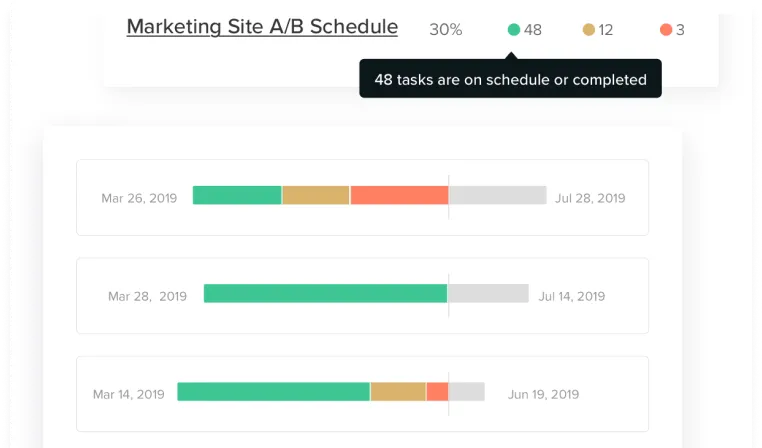
See what’s on time or running behind at a glance.
Hourly estimation
Improve resource allocation and spot overages early.
Global workloads
See resource demand across every project.
Asset management
Manage equipment and spaces as easily as people.
Workloads report
Track resource utilization across active projects.
Time tracking
Log and manage time directly in your plan.
Timesheet reports
Track time and review timesheets right in your plan.
Portfolio dashboard
Track status across every project in one easy view.
Project filters
Find what you need fast with filters.
Show/hide columns
Customize the project details you display.
Notifications & alerts
Stay informed with automatic updates and alerts.
User management
Control access and permissions easily.
Activity log
Track updates and undo changes in the project history.
Project exports
Download project plans in multiple formats.
Print timeline PDFs
Share or archive schedules as clean PDFs.
Embed timelines
Display Gantt charts directly on your site.
Zapier integration
Automate project updates and workflows.
Trello Power Up
Sync boards and cards directly with TeamGantt tasks.
Custom API
Connect TeamGantt data to your existing tools.
Task search
Find any task in seconds.
Mobile access
Manage projects anywhere, from any device.
Works on Mac & PC
Access your projects from any computer.
Unlock all features free for 14 days
Deliver every project with
calm, clarity, and confidence.
Join 2 million users who trust TeamGantt to keep their projects on track.
Try TeamGantt free
Used by teams at